Bro

Task Management Application
User Guide
Are you missing deadlines because you can't remember all the work you have?
Do not worry!! We have Bro, your personal task manager to the rescue.
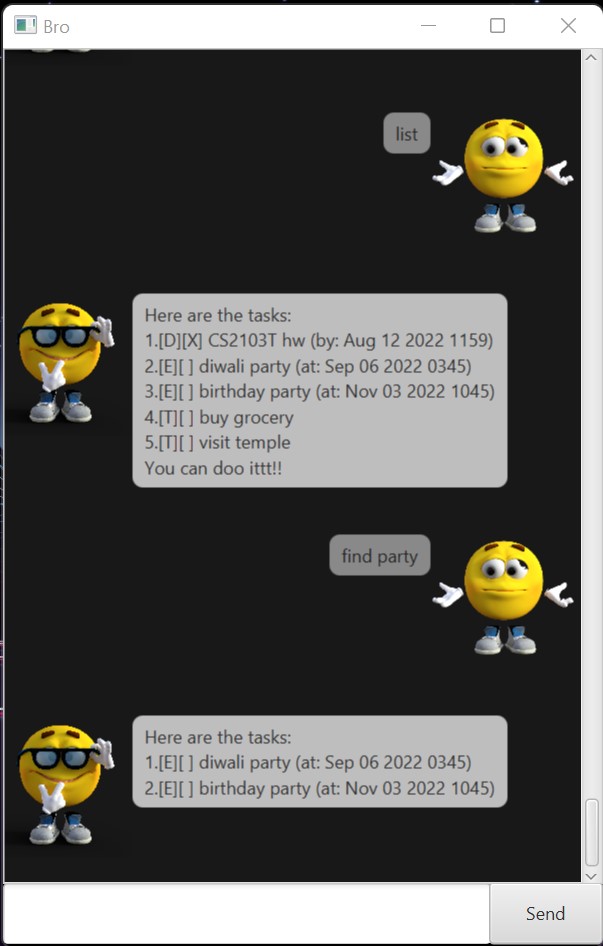
Table of Content
Quick Start
- Please ensure that you have Java 11 or above installed in your computer.
- Download the latest Bro.jar from here.
- Copy the file to the directory you want to use.
- Please run the application.
- A GUI similar to the above one appears.
- If the previous step doesn't work, open the terminal and try running
java -jar bro.jar. - Type in the command and press Enter or click on the Send button to execute it.
Features
Add your ToDo task
Add your task with Deadline
Add your Event task
View all your tasks
Mark your task as done
Mark your task as undone
Delete your task
Find your task by keyword
Display help message
Exit chatbot
Usage
To add your ToDo task - todo
Adds To Do task to your task manager.
Command Format : todo [task description]
Example of usage:
todo buy grocery
> [T][ ] buy grocery
> You only have 1 task left!
To add your task with Deadline - deadline
Adds task with deadline to your task manager.
Command Format : deadline [task description] /by [dd/mm/yyyy hhmm]
Example of usage:
deadline CS2109S assignment /by 11/10/2022 2359
> [D][ ] CS1209S assignment (by: Oct 11 2022 2359)
> You only have 2 tasks left!
To add your Event task - event
Adds an Event task to your task manager.
Command Format : event [task description] /at [dd/mm/yyyy hhmm]
Example of usage:
event birthday party /at 18/09/2022 2230
> [E][ ] birthday party (at: Sep 18 2022 2230)
> You only have 3 tasks left!
To view all your tasks - list
Shows all the task in the task manager with the mark and unmark sign.
Command Format : list
Example of usage:
list
> Here are the tasks:
> 1.[T][X] buy grocery
> 2.[D][ ] CS1209S assignment (by: Oct 11 2022 2359)
> 3.[E][ ] birthday party (at: Sep 18 2022 2230)
> You can doo ittt!!
To mark your task as done - mark
Marks the task as done with a "X" sign.
Command Format : mark [index]
Example of usage:
mark 1
> I have marked this task
> [T][X] buy grocery
To mark your task as undone - unmark
Marks the task as not done by replacing "X" sign with " ".
Command Format : unmark [index]
Example of usage:
unmark 1
> I have unmarked this task
> [T][ ] buy grocery
> You only have 3 tasks left!
To delete your task - delete
Removes the task from the task manager.
Command Format : delete [index]
Example of usage:
delete 1
> I have removed this task
> [T][ ] buy grocery
> You only have 2 tasks left!
To find your task by keyword - find
Finds the task(s) with the given keyword.
Command Format : find [keyword]
Example of usage:
find party
> Here are the tasks:
> 1.[E][ ] birthday party (at: Sep 18 2022 2230)
> 2.[E][ ] diwali party (at: Oct 17 2022 1030)
To display help message - help
Displays the help message.
Command Format : help
Example of usage:
help
> COMMAND        PURPOSE
> 1. list:
>            To view the tasks left
> 2. todo descr:
>            To add todo task
> 3. deadline descr /by dd/mm/yyyy hhmm:
>            To add task with deadline
> 4. event descr /at dd/mm/yyyy hhmm:
>            To add an event
> 5. mark index:
>            To mark the task as done
> 6. unmark index:
>            To mark the task as not done
> 7. delete index:
>            To delete the task in that index
> 8. find keyword:
>            To find task with the keyword
> 9. bye:
>            To exit the chatbot
To exit the chatbot - bye
Closes the program.
Command Format : bye
Example of usage:
bye
> See you later broo!
Command Summary
| COMMAND | FORMAT, EXAMPLES |
|---|---|
| Help | help |
| Add ToDo Task | todo [descr] e.g., todo buy grocery |
| Add Deadline Task | deadline [descr] /by [dd/mm/yyyy hhmm] e.g., deadline CS2109S HW /by 10/10/2022 2359 |
| Add Event Task | event [descr] /at [dd/mm/yyyy hhmm] e.g., event Neon Party /at 18/09/2022 2110 |
| Mark Task | mark [index] e.g., mark 2 |
| Unmark Task | unmark [index] e.g., unmark 2 |
| Find Task with the keyword | find [keyword] e.g., find party |
| Delete Task | delete [index] e.g., delete 1 |
| View all Tasks | list |
| Exit | bye |